Website monitoring & uptime trackingSimple for beginners. Powerful for experts.
WWT pairs a non-technical owner who simply needs the domain renewed in time with the engineer who needs to know the moment a production site begins negotiating TLSv1.0. One platform, two audiences - checked every minute, alerted to the right person on the right channel.
Made by people who've been on the other end of the alert.
WWT comes from three decades of carrying production. Three decades of fixing the certificate that 'just expired', the domain that 'somehow lapsed', the staging URL that started returning 5xx at 2am - and three decades of wishing the watch-tower had been there before the phone rang.
If you're not technical, this is the friend who quietly checks every morning whether your company website still answers, whether the domain is still in your name, whether the certificate won't trip a browser warning next week. You don't need to know what TLSv1.0 is - we'll only tell you in plain language when it actually matters.
If you are technical, this is the same friend with all the knobs visible. Per-site failure thresholds, parallel checks, audit log of every alert, RDAP for domain registrars, SPF/DMARC drift detection, nine notification channels each in their own language - built by hands that have done the on-call rotation.
WWT is free because monitoring isn't a luxury subscription. Knowing whether your site works at 3am isn't an add-on - it's table stakes. We didn't build this for an exit; we built it so anyone - a one-person business, a school, a sysadmin with a hundred domains - can stop refreshing and start watching, without sending a credit card first.
- the WWT crew
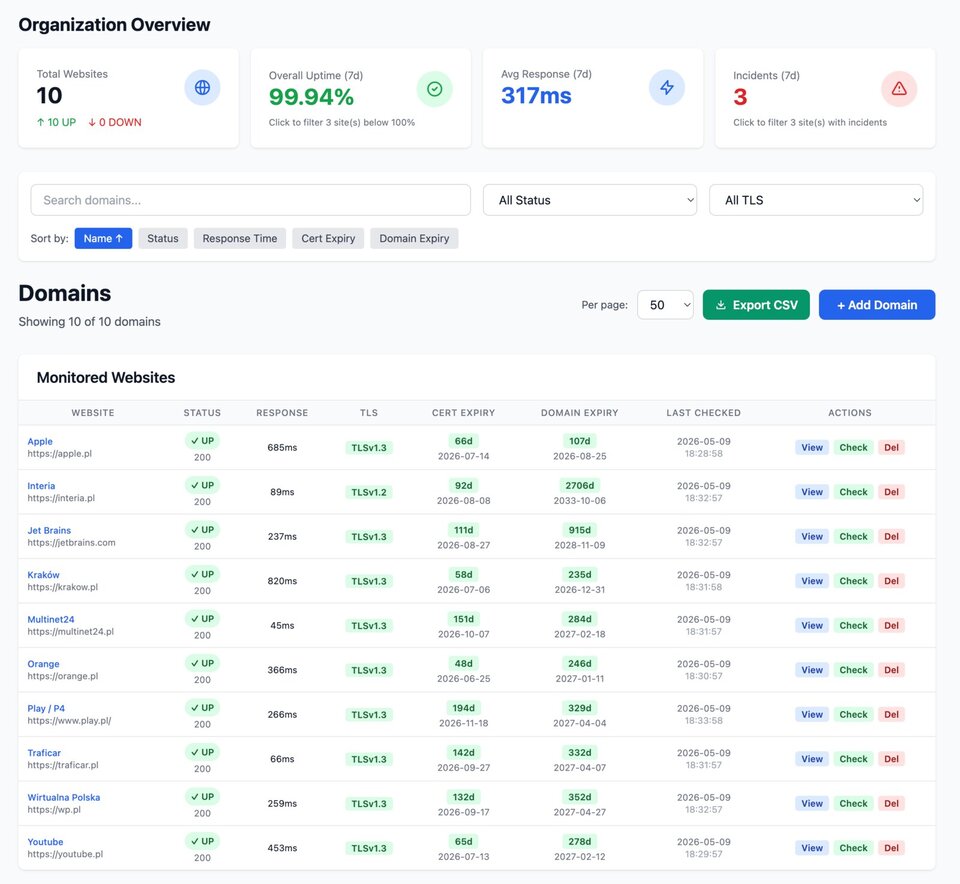
Built for the whole team.
One tool, two very different jobs. WWT scales from a single domain expiry alert to a parallel-checked TLS audit across hundreds of sites.
Confidence that nothing slips through.
The domain renewals, certificate expirations and basic availability of every business-critical site - handled in the background. Add a domain in under a minute, choose who should be notified, and trust that you will hear about it long before a customer does.
- Domain registration expiry alerts on a five-step schedule (30, 14, 7, 3, 1 day)
- SSL certificate expiry alerts on the same schedule
- Notifications written in clear language - no log dumps, no jargon
- CSV bulk import to onboard an entire portfolio in one upload
The depth your runbook deserves.
Per-site failure thresholds, parallel workers, minute-precise recovery detection, and an audit log of every alert and every suppression. SPF, DMARC, DKIM and TLS-version drift are checked daily and reported per record - so a silent regression never becomes a postmortem.
- Per-site failure-count threshold filters out flapping checks
- Up to 15 parallel workers - capacity grows with your portfolio
- Email, Slack, Teams, Discord, Mattermost, Telegram, PagerDuty, Pushover, Webhook - independently routable per channel, each in its own language
- Audit log: every alert, every suppression, every override
One subscription, every check that matters.
Stop bolting together five different services. WWT covers uptime, performance, certificates, domain registration and email security - under a single dashboard.
Uptime monitoring
Per-minute HTTP checks with parallel workers. Configurable per-site interval and timeout.
Performance tracking
Response time logged on every check. Charts from one hour to a year.
TLS version reporting
Daily report of which TLS protocol versions your server actually negotiates.
Domain expiry (RDAP)
Live registrar lookup with a manual override for unsupported TLDs.
Email alerts
Plain-English notifications you can hand to a non-technical recipient.
Team collaboration
Multiple owners and members per organization, multi-org switching, role-based access.
Certificate expiry
Days remaining on the X.509 cert, with notifications at 30 / 14 / 7 / 3 / 1 days.
HTTP status filtering
Choose per-site which response classes count as success: 2xx, 3xx, 4xx, 5xx.
Multi-channel alerts
Email, Slack, Teams, Discord, Mattermost, Telegram, PagerDuty, Pushover and Webhook - every channel has a Test button and its own language setting.
SPF / DMARC / DKIM
Daily email-security record checks with the parsed record on display.
Audit log
Every notification, suppression, settings change and override is recorded.
CSV import & export
Bulk import websites with a 9-column CSV. Export the full list at any time.
See WWT at work.
Real screenshots from the live application.
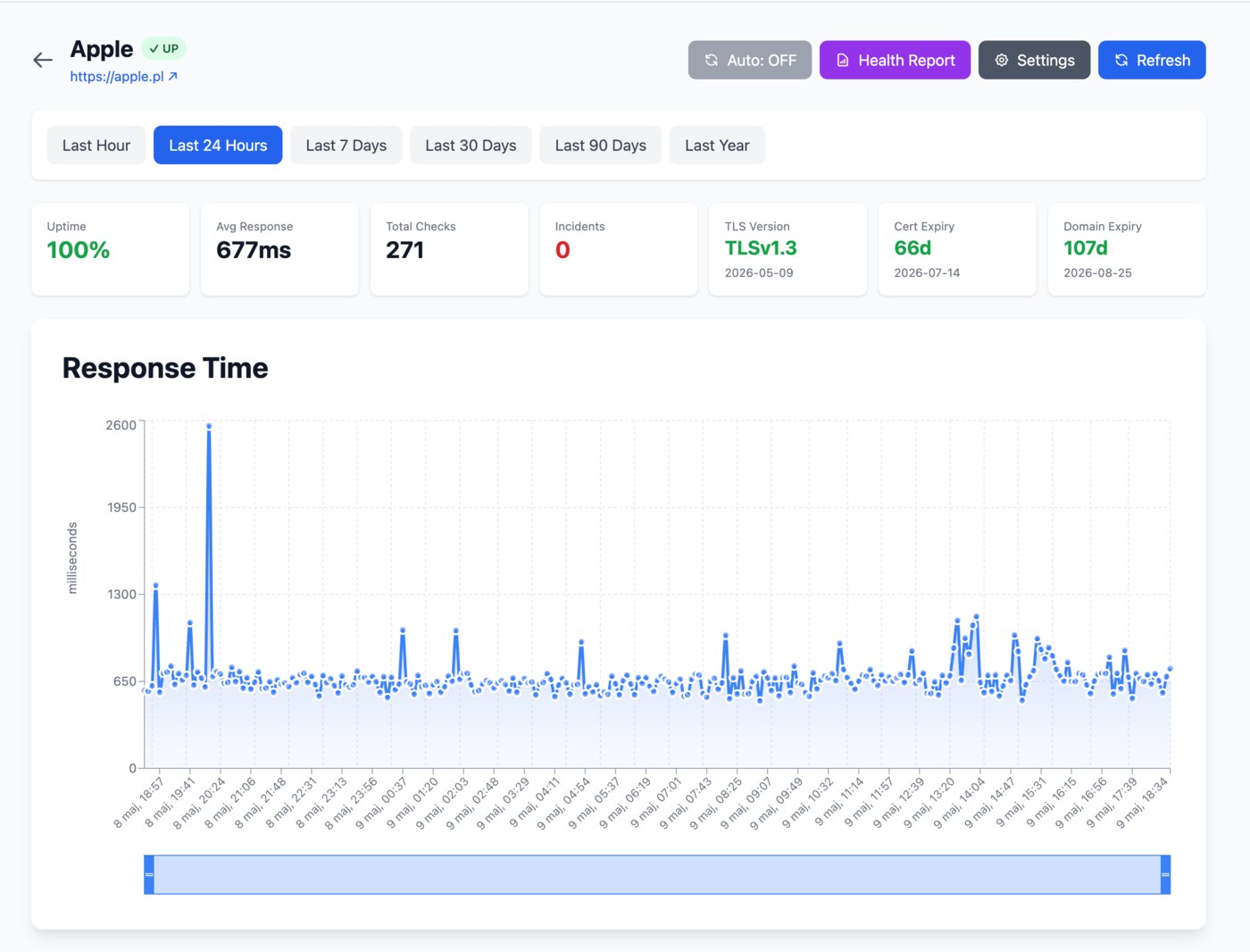
Every check, on one timeline.
Open a website to see uptime, response time, TLS version, certificate expiry, domain registration and recent checks - with chart ranges from one hour to a year.
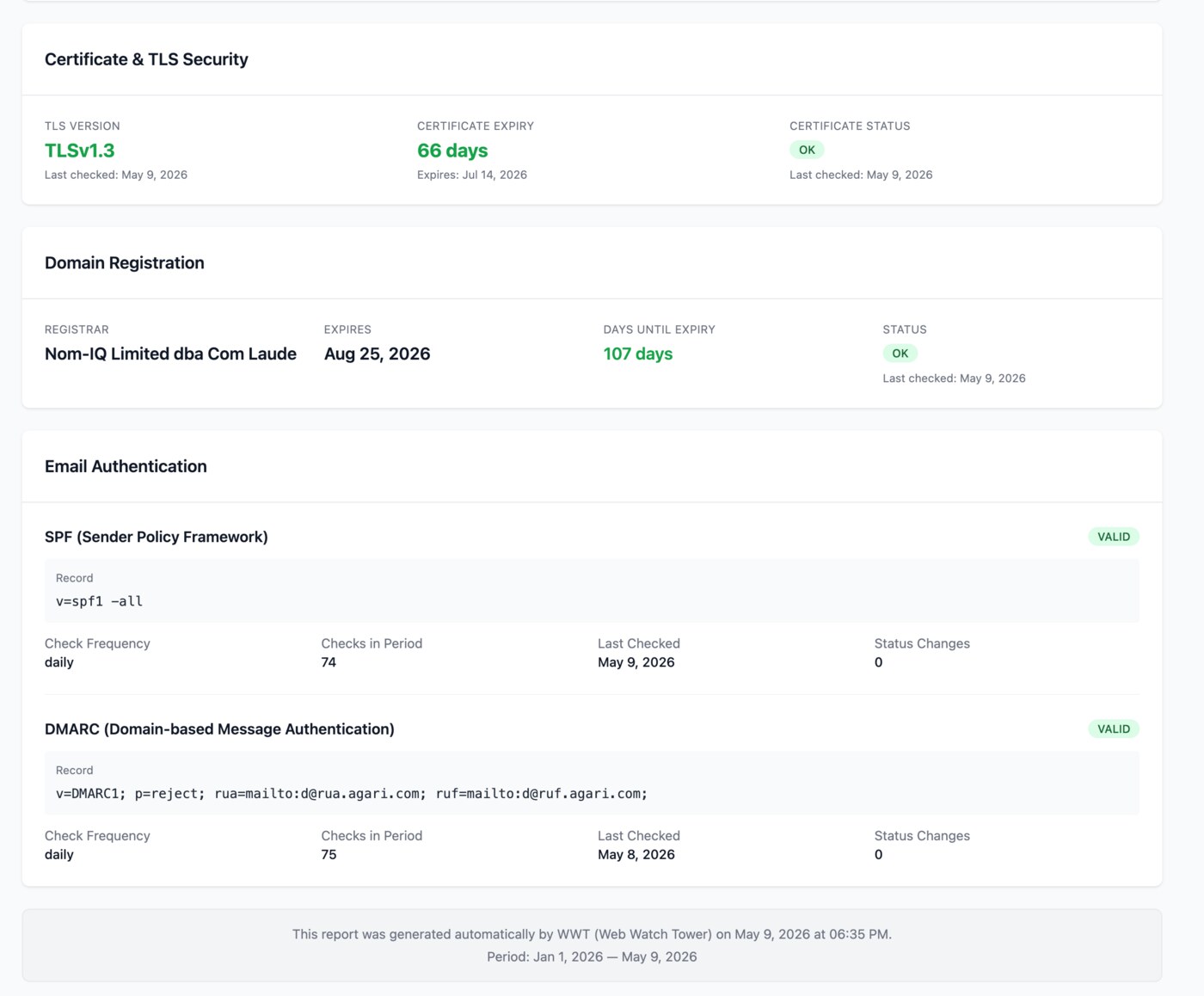
TLS, cert, registrar, SPF, DMARC.
Every security signal that matters, in one panel - with the underlying record on display so you can verify what was actually checked.
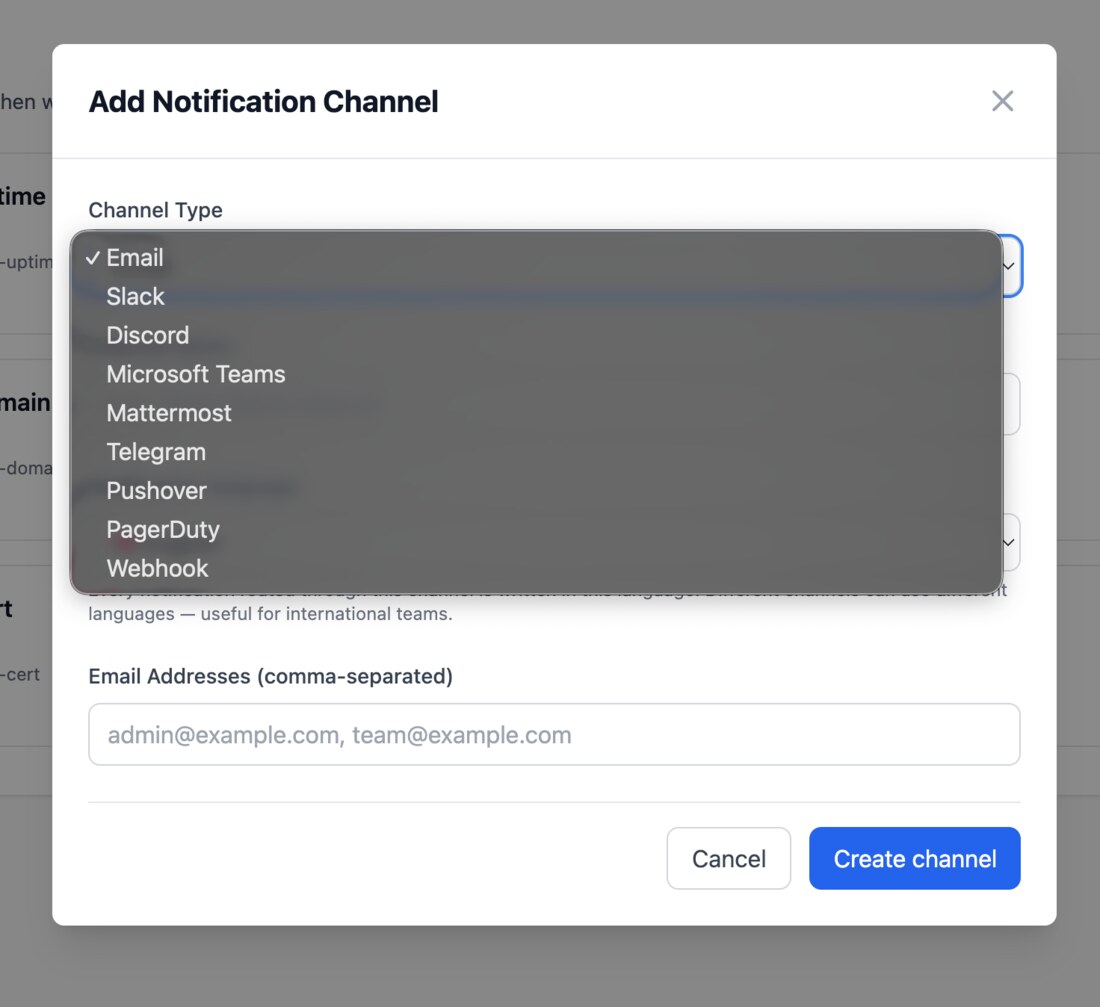
The right person, the right channel.
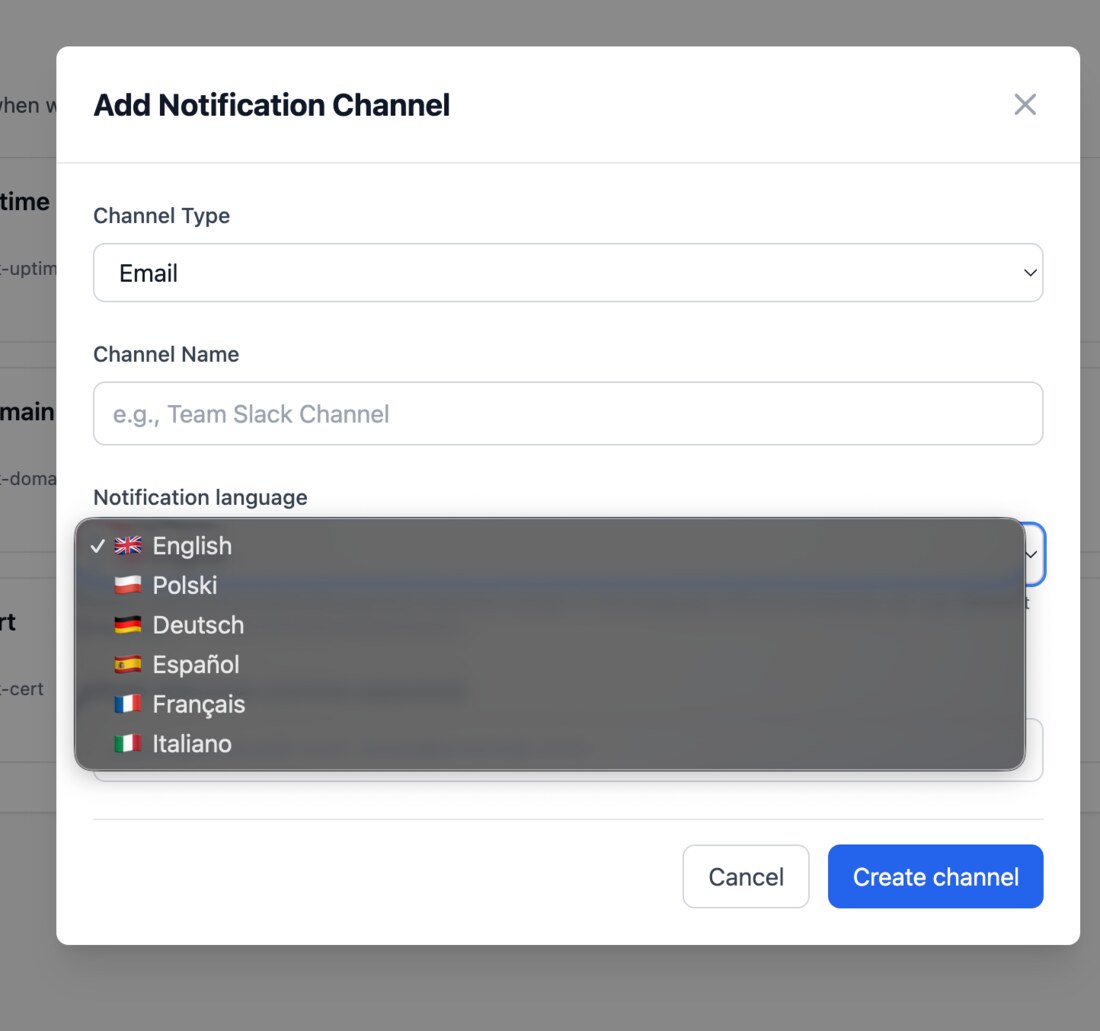
Define as many channels as you need - Email, Slack, Microsoft Teams, Discord, Mattermost, Telegram, PagerDuty, Pushover or your own Webhook - and decide independently which channel handles each kind of alert: uptime incidents, certificate expirations, domain renewals and email-security regressions. Each channel ships with a Test button. And because every channel carries its own language setting, an international team can route Polish-language alerts to one Slack channel and English-language alerts to another - same incident, two languages.
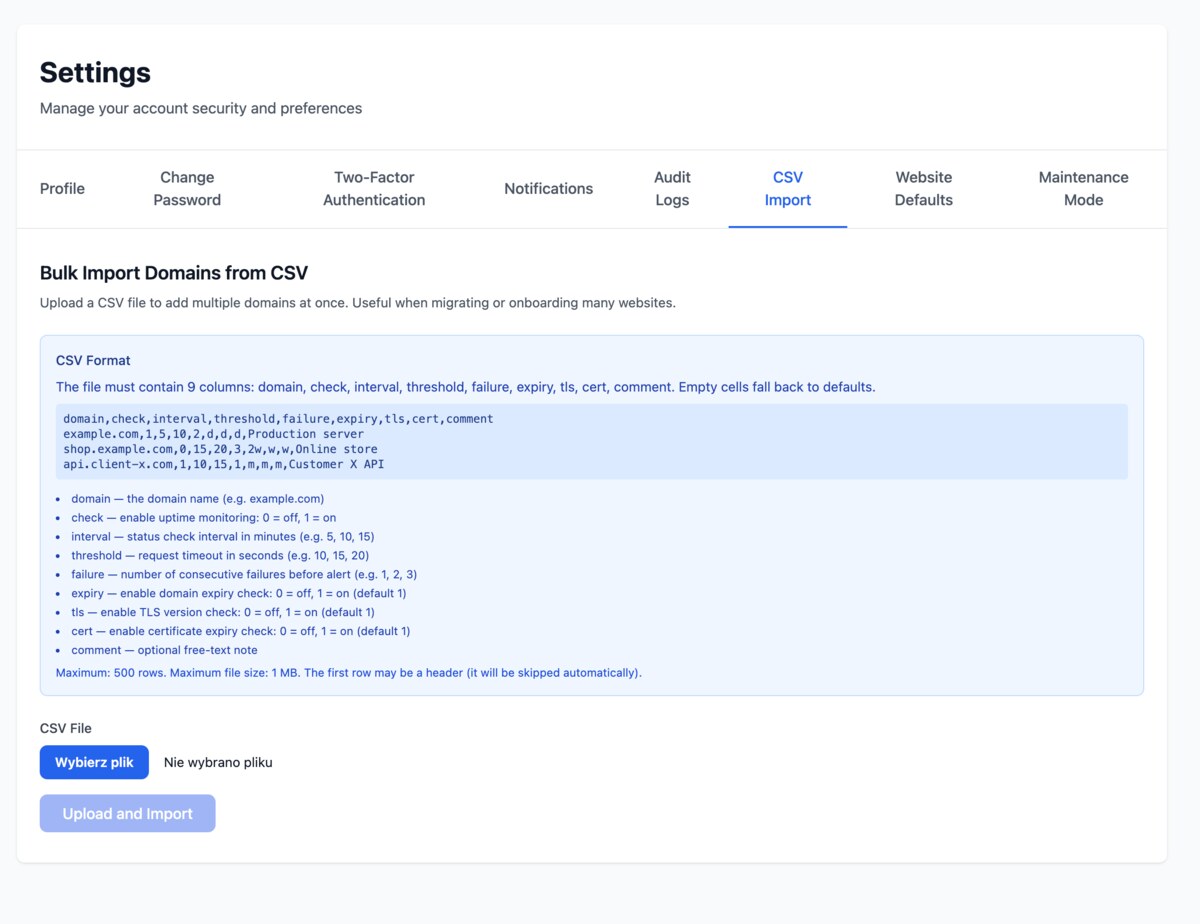
Hundreds of domains - one upload.
No need to add domains one at a time. Drop in a single CSV - up to 100 rows - and every site is onboarded with the correct interval, threshold and check toggles in seconds. Migrating from another tool, or rolling out across a portfolio, becomes a single click instead of an afternoon.
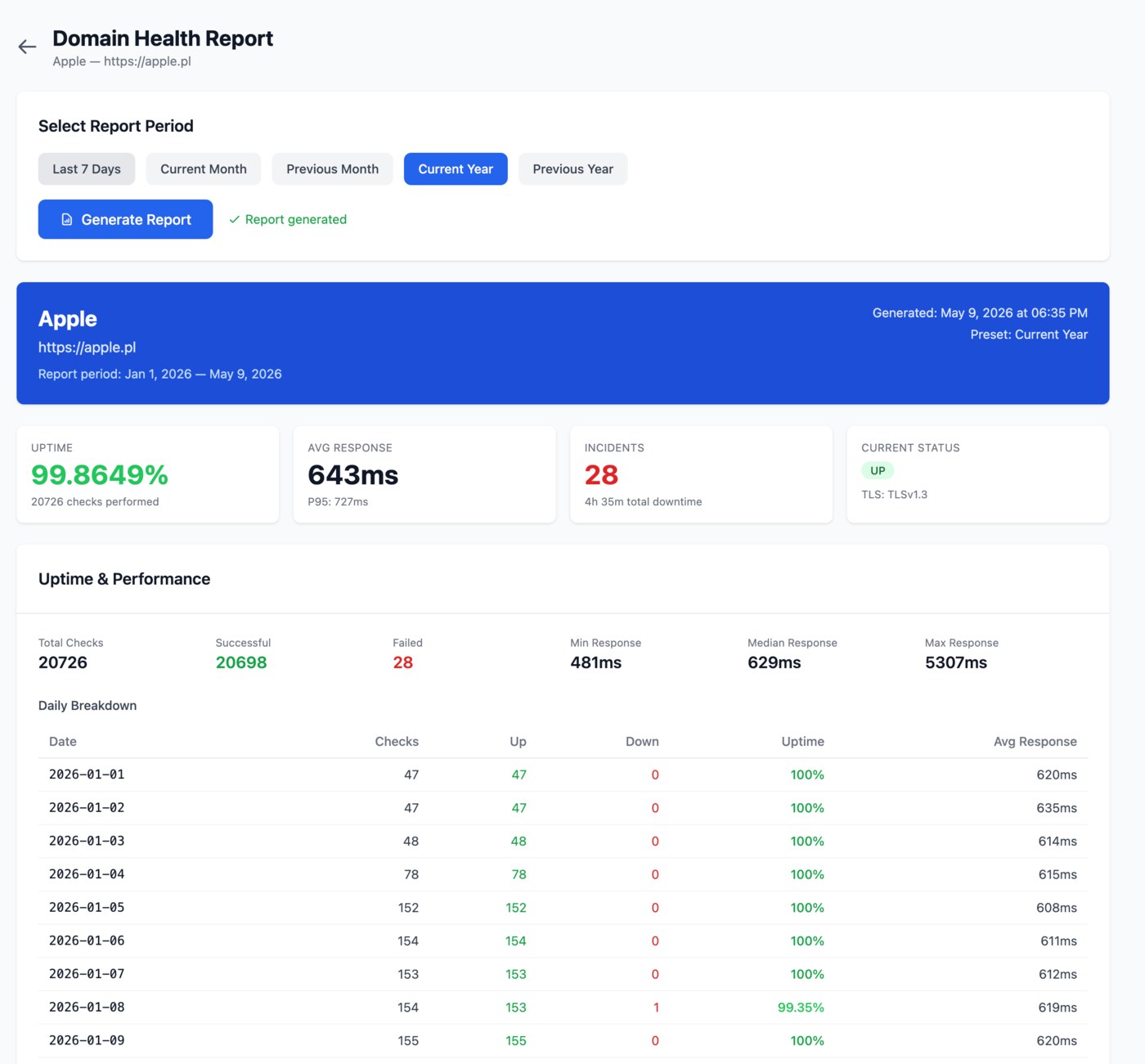
A printable snapshot for any stakeholder.
One-click PDF-style summary covering uptime percentage, response time percentiles, incident count, daily breakdown, and the current security posture.
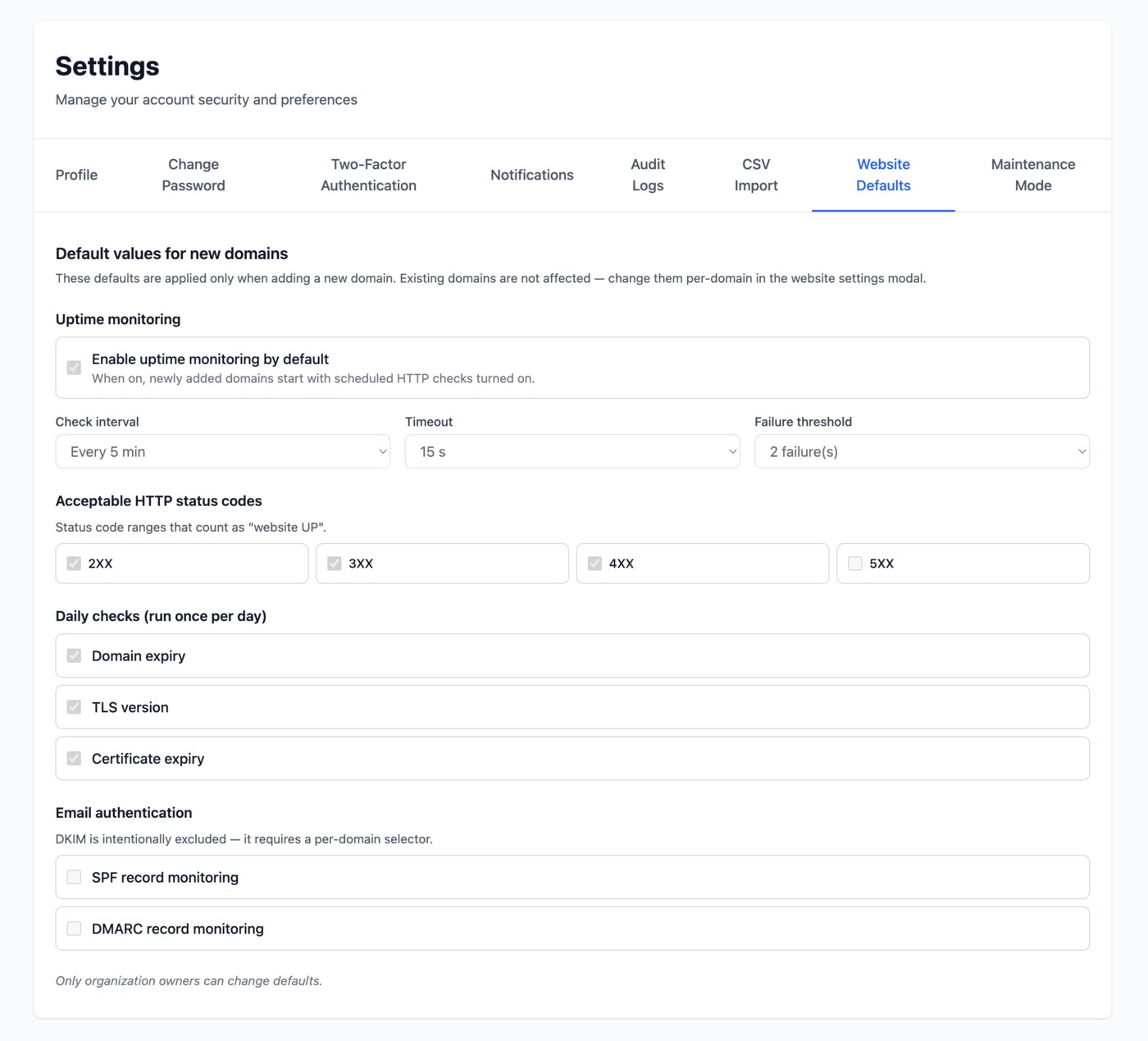
Set the standard once. Every new domain inherits it.
Define the default check interval, timeout, failure threshold, accepted HTTP status codes and which daily checks run - at the organization level. Every new domain you add starts pre-configured to your team's standard. Existing sites are never silently changed.
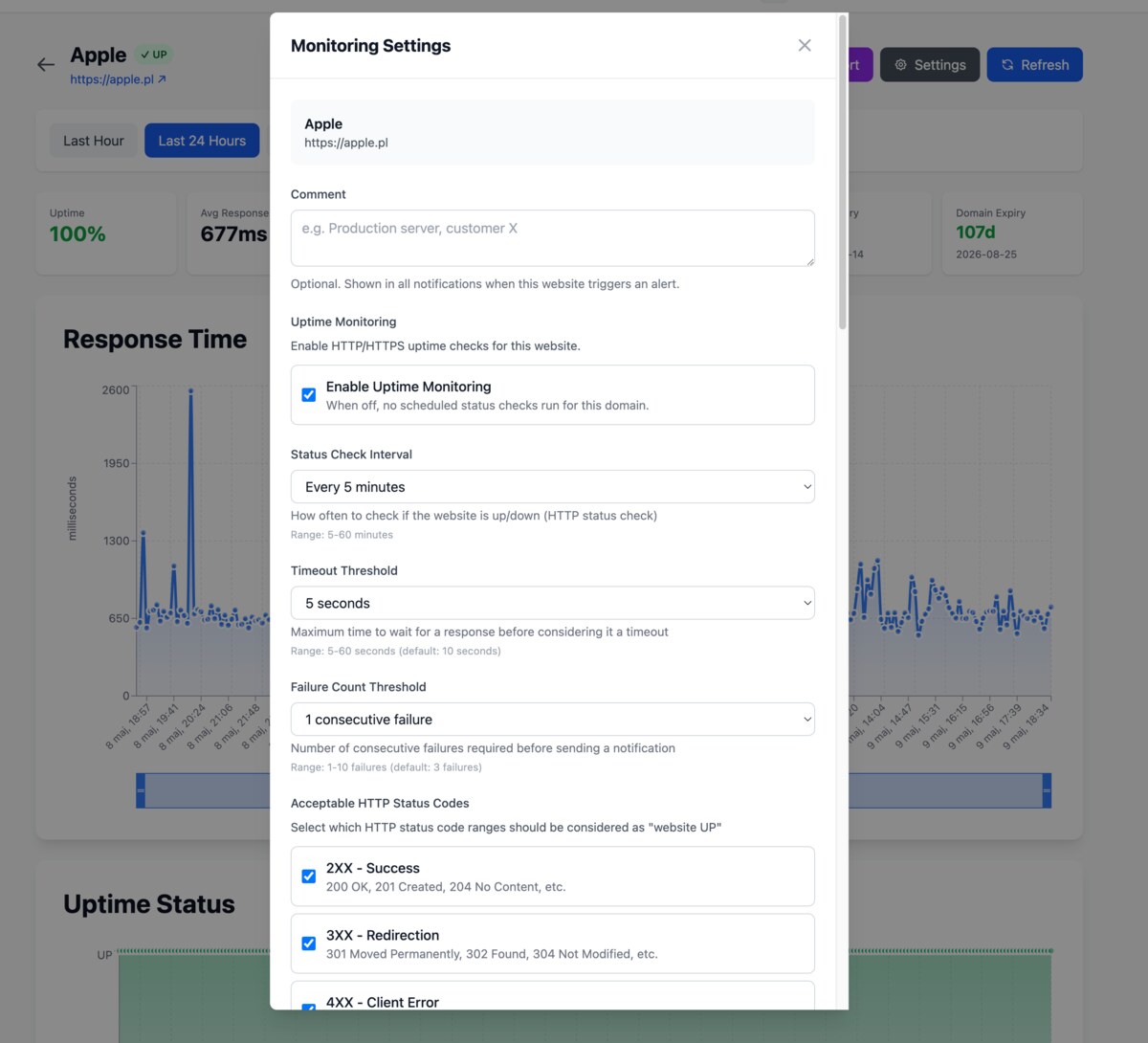
Override anything, on any single domain.
A noisy domain that needs a longer timeout? A high-priority production site that should be checked every minute? A staging URL that legitimately returns 4xx? Open the per-website settings, override the values that need it, leave everything else on the team default.
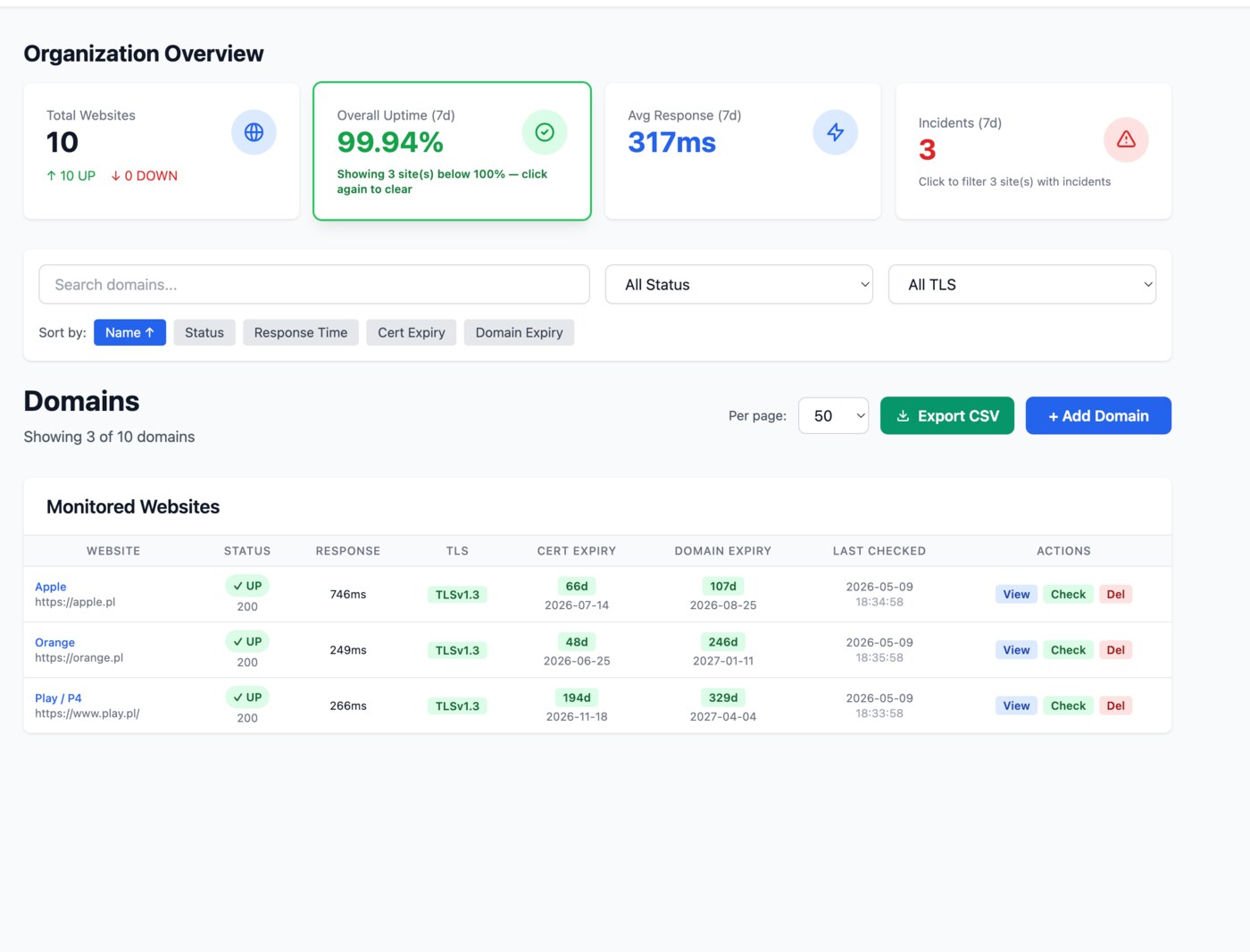
Click any stat. The list narrows.
The dashboard summary cards are clickable filters. Click "Overall Uptime" to see only the sites under 100% in the last seven days, or "Incidents" to focus on the ones that actually went down. Combine with the search box and column sort to drill into exactly the slice you need.
WWT vs the usual suspects.
A quick honest table - the checks WWT bundles in by default versus three popular alternatives. "Limited" means the feature exists but in a narrower form, on a paid tier, or behind add-ons.
| Feature | WWT | StatusCake | UptimeRobot | Pingdom |
|---|---|---|---|---|
| Per-minute uptime checks | limited | limited | ||
| TLS version reporting | limited | |||
| Certificate expiry alerts | ||||
| Domain registrar (RDAP) monitoring | ||||
| SPF / DMARC / DKIM monitoring built-in | ||||
| Multi-tenant orgs with multi-owner | limited | |||
| 9 channels: Email, Slack, Teams, Discord, Mattermost, Telegram, PagerDuty, Pushover, Webhook | limited | |||
| Audit log of every alert & change | limited | limited | ||
| Maintenance mode (suppress alerts) | limited | limited | ||
| CSV bulk import | limited | limited | ||
| Org-level website defaults template | ||||
| Per-site failure-count threshold | ||||
| 2FA (TOTP) | ||||
| Six-language interface | ||||
| Free to use - no paid tier | limited | limited |
Comparison reflects publicly documented features at the time of writing. Competitor offerings change frequently - always verify on the vendor's site before purchase.
Security is the default.
Mandatory email verification, optional 2FA, throttled login and password reset, audit log of every action, SSRF protection on every monitored URL.
Quick answers
The full FAQ covers every feature in detail.
What does WWT actually check?
How do I receive alerts?
Will I get woken up by every flaky network blip?
Is there any cost?
Are there any limits?
Recently shipped
See all updates- New
New: Sign in with Google
You can now create an account or log in with one click using your Google account - no extra password to remember. When you sign in with Google, your profile picture becomes your avatar across WWT.
- Improved
Updated Terms and Privacy Policy
We refreshed our Terms of Service and Privacy Policy to be clearer and more complete, including how Sign in with Google works and the trusted services we rely on.
- Improved
A recognizable monitoring agent
Our uptime checks now identify themselves with a dedicated User-Agent, so you can easily recognize and allowlist our monitor in your firewall or WAF. Learn more: https://webwatchtower.app/bot
Stop refreshing. Start watching.
Add your first website in under a minute. No credit card. No commitments.
Get started - free